
Part 2 - Viewing pages
Everything in a SQL Server database lives in an 8 KB (8192 byte) page. In this part we'll use the Page Viewer to look at pages in detail:
- Opening pages and page addresses
- The page header
- Records and slots
- How pages are linked together
- Page types - Data, Index, LOB, and allocation pages
This part continues with the InternalsViewerTutorial database from Part 1.
Step 1 - Opening pages
There are several ways to open a page in the Page Viewer:
- Click on a page in the allocation map
- Click on an entry point link (Root Page / First Page / First IAM Page) in the Allocation Info table
- Click on any page address link, formatted as
(File Id:Page Id), anywhere in the application - Type an address directly into the page address box in the top left of the Page Viewer and press enter
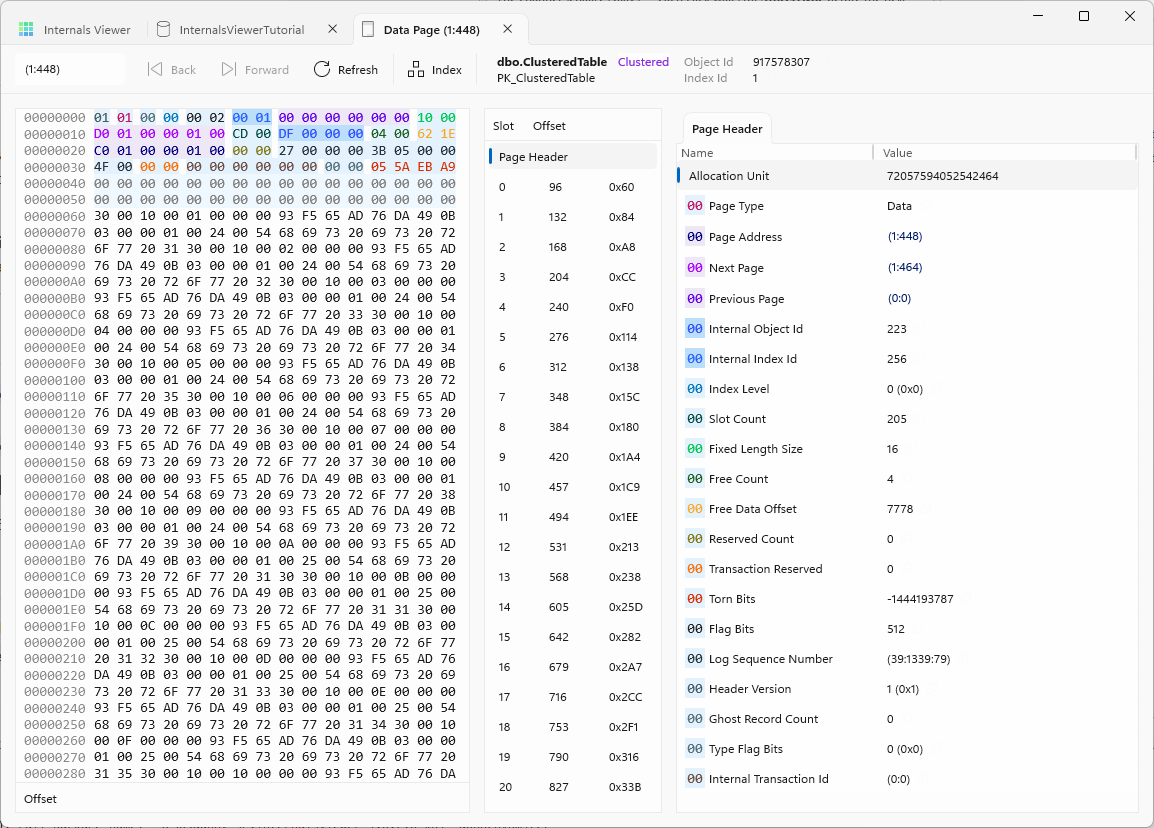
The toolbar has a Refresh button to re-read the page from the database.
The header bar shows the page type and which object the page belongs to, and the command bar's overflow menu has the Object Id and Index Id from the database metadata.
TIP
The page address box accepts (1:704) or 1:704. This is useful for jumping to pages referenced by DBCC commands or system views.
TIP
Clicking a page address link in the Page Viewer opens the page in the same tab. Shift + click opens it in a separate tab instead - useful for keeping the current page open while following a pointer, e.g. comparing the two ends of a Next Page link.
TIP
To find the page a specific row is stored on, the %%physloc%% virtual column gives a row's physical address - see Finding the page for a row in the user guide.
Step 2 - The page header
Every page starts with a 96 byte header that describes the page and its place in the database. When a page is opened the Page Header is selected in the slot table and its decoded values are displayed.
Some of the key fields:
| Field | Description |
|---|---|
Page Type | What the page is used for - Data, Index, IAM, PFS, etc. |
Page Address | The address of this page |
Next Page / Previous Page | Links to sibling pages, used by index level pages. (0:0) means no link |
Internal Object Id / Internal Index Id | Which object and index the page is allocated to |
Index Level | Level in the index B-Tree. 0 is the leaf level |
Slot Count | Number of records on the page |
Free Count | Number of free bytes remaining on the page |
Free Data Offset | Offset of the start of the free space |
Log Sequence Number | The LSN of the last log record that changed the page |
Torn Bits | Used by the torn page / checksum page verification options |
Clicking on a field in the decoded information highlights where its bytes are in the raw data.
See the Page Header reference for the full list of fields.
Step 3 - Records and slots
Below the Page Header in the slot table are the records on the page.
Records are added to a page from the top down (after the header), while the slot offset array grows backwards from the end of the page. Each entry in the array is two bytes giving the offset of a record. The Slot / Offset table in the middle of the Page Viewer is a decode of this array - the Offset column shows where each record starts in the page, in decimal and hex.
NOTE
The slot array defines the logical order of records. On index pages (and the leaf of a clustered index) the slots are in key order even if the record data itself was written to the page in a different physical order.
Click on a slot to decode the record:
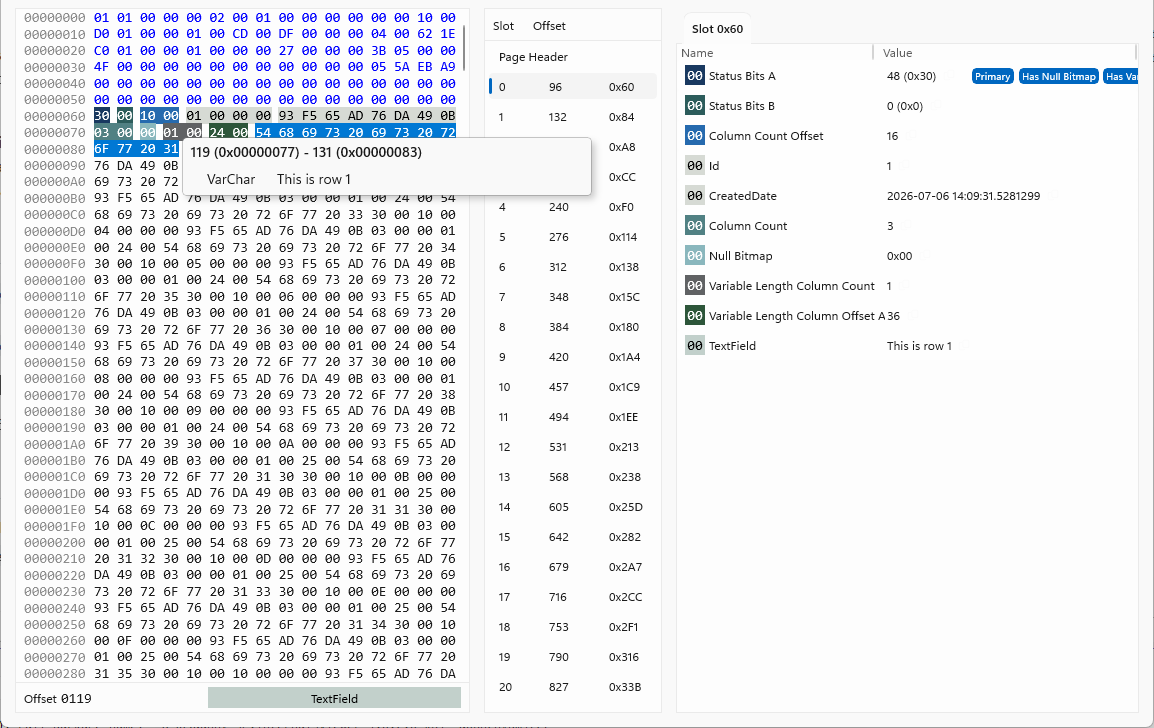
The decoded information shows the parts of the record structure:
Status Bits A- flags describing the record, e.g. record type, if it has a null bitmap, if it has variable length columnsColumn Count OffsetandColumn Count- where the fixed length portion ends and how many columns the record hasNull Bitmap- one bit per column indicating null valuesVariable Length Column CountandVariable Length Column Offset Array- the offsets where each variable length column ends- The column values themselves, decoded into their data types
This is the FixedVar record format - fixed length columns are stored first at fixed offsets, then variable length columns are located via the offset array. See the Data Records reference for the format details.
Selecting a range of bytes in the raw data shows a popup decoding those bytes in the applicable data types, and the status bar shows the offset and structure under the pointer.
The status bar at the bottom shows the current offset and which structure the cursor is over.
Forwarding records
Heaps have a record type of their own worth seeing. When a heap row is updated and no longer fits on its page, SQL Server moves the row to another page and leaves a forwarding stub at the original slot pointing to the new location - so non-clustered indexes, which point at the row by its physical address, don't all have to be updated. (Rows in a clustered index move within the B-Tree instead, so this only happens in heaps.)
To create one, fill a heap page almost completely:
CREATE TABLE dbo.ForwardingTable
(
    Id        INT           NOT NULL
   ,TextField VARCHAR(8000) NOT NULL
)
GO

INSERT INTO dbo.ForwardingTable
        (Id, TextField)
VALUES  (1, REPLICATE('A', 2500))
       ,(2, REPLICATE('B', 2500))
       ,(3, REPLICATE('C', 2500))
GO
Refresh and open the table's First Page - three Data records in slots 0 to 2, with the page nearly full. Now grow the middle row past the remaining free space:
UPDATE dbo.ForwardingTable
SET    TextField = REPLICATE('B', 7000)
WHERE  Id = 2
GO
Refresh the page. The row is gone from slot 1 - in its place is a tiny Forwarding Stub record whose only content is the RID of the row's new location. Follow it and the moved row's record is flagged as a forwarded record in its status bits, and carries a back pointer to the stub so the heap can find its way back if the row ever shrinks and returns home.
The stub matters for performance: anything arriving at the original RID - a RID lookup from a non-clustered index, for example - now pays an extra page read to follow it. Part 3 comes back to this when comparing the two row locator types.
See the Forwarding Stub glossary entry and the Data Records reference.
Step 4 - Linked pages
In Part 1 we saw that heap pages are not linked together. To see Next Page / Previous Page in action we need an index. Create a table with a clustered index and insert enough rows to fill a few hundred pages:
CREATE TABLE dbo.ClusteredTable
(
    Id          INT IDENTITY(1,1) NOT NULL
   ,TextField   VARCHAR(100)      NOT NULL
   ,CreatedDate DATETIME2         NOT NULL

   ,CONSTRAINT PK_ClusteredTable PRIMARY KEY CLUSTERED (Id)
)
GO

INSERT INTO dbo.ClusteredTable
        (TextField, CreatedDate)
SELECT  TOP (100000)
        CONCAT('This is row ', ROW_NUMBER() OVER (ORDER BY (SELECT NULL)))
       ,SYSDATETIME()
FROM    sys.all_columns AS c1
        CROSS JOIN sys.all_columns AS c2
GO
Refresh the database tab. The allocation map shows the new allocations for the table.
A table with a clustered index is the index - the data pages are the leaf level of the clustered index B-Tree, kept in key order and linked together.
Find dbo.ClusteredTable in the Allocation Info table (the Filter box helps) and click on its First Page entry point.
In the page header:
Page Typeis DataIndex Levelis 0 - the leaf levelPrevious Pageis(0:0)- this is the first page so there is nothing before itNext Pagepoints to the next data page in key order
Click the Next Page link to walk along the chain. Each page's Previous Page points back to the page you came from - the leaf level is a doubly linked list. This is the structure SQL Server uses for range scans: seek to the start of the range, then follow the links.
The first record on each page carries on where the last record of the previous page left off - check the Id values in slot 0 as you navigate.
Step 5 - Page types
Page Type in the header tells us what a page is used for. The main types are:
| Page Type | Description |
|---|---|
| Data | Table rows - heap pages or the leaf level of a clustered index |
| Index | Index records - non-leaf levels of a clustered index, all levels of a non-clustered index |
| LOB (Text/Image) | Large object data stored off-row, e.g. VARCHAR(MAX), NVARCHAR(MAX), XML |
| IAM | Index Allocation Map - tracks which extents belong to an object |
| PFS | Page Free Space - allocation status and fullness of each page |
| GAM / SGAM | Global Allocation Map - tracks which extents are allocated |
| DCM / BCM | Differential Changed Map / Bulk Changed Map - track changes for backups |
| File Header / Boot | File and database metadata |
Some pages are always at fixed addresses in each data file: the File Header is page (1:0), the first PFS is (1:1), the first GAM is (1:2), the first SGAM is (1:3), and the database Boot page is (1:9). Try typing these addresses into the page address box to have a look around.
LOB pages get a part of their own - Part 5 - LOB data follows a VARCHAR(MAX) value through in row, off page, and split storage.
Step 6 - Allocation pages
Finally, let's look at the pages SQL Server uses to track allocations, starting with the IAM.
Click on the First IAM Page entry point for one of the tables:
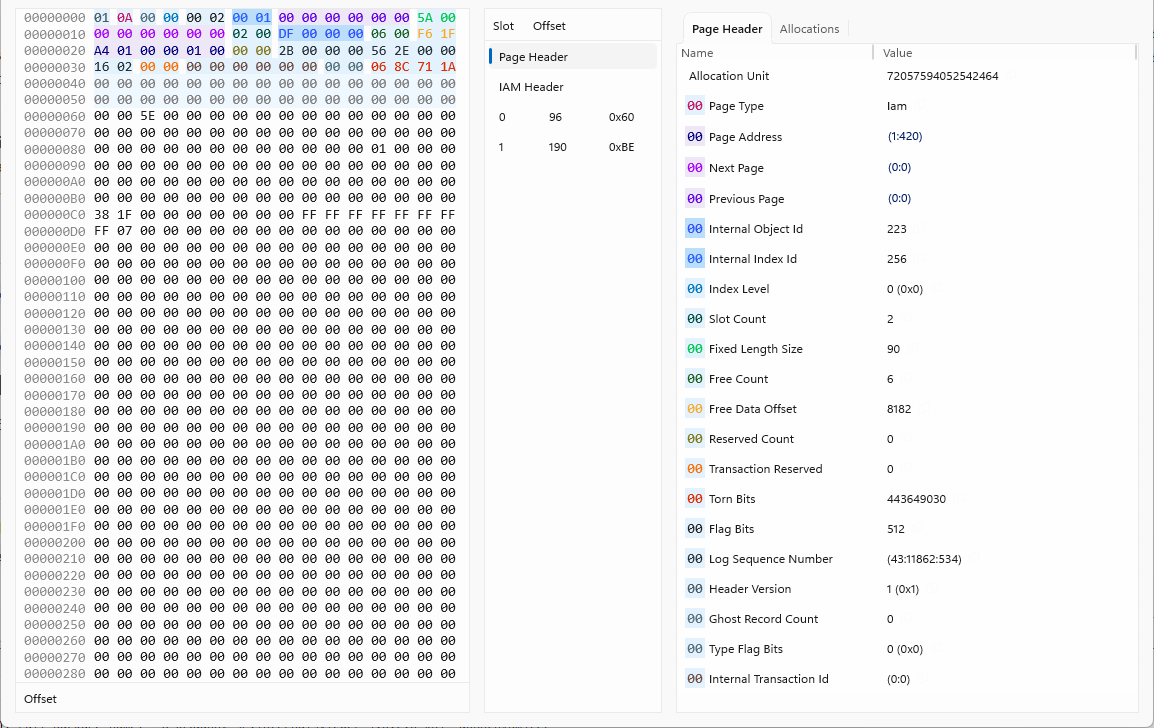
Instead of records, this page has an IAM header and a bitmap. The decoded information shows:
IAM Start Page- the extent range this IAM page coversSingle Page Slot 0-7- addresses of single page allocations (used when mixed extents are enabled - with modern defaults these will be(0:0))Allocation Map- the bitmap, one bit per extent
Each bit set to 1 means that extent is allocated to this object. One IAM page covers roughly 64,000 extents (about 4 GB of a file); if the file is bigger, IAM pages are chained together via Next Page in the header - this is the IAM chain.
For allocation pages the Page Viewer has an extra Allocations tab that renders the bitmap visually:
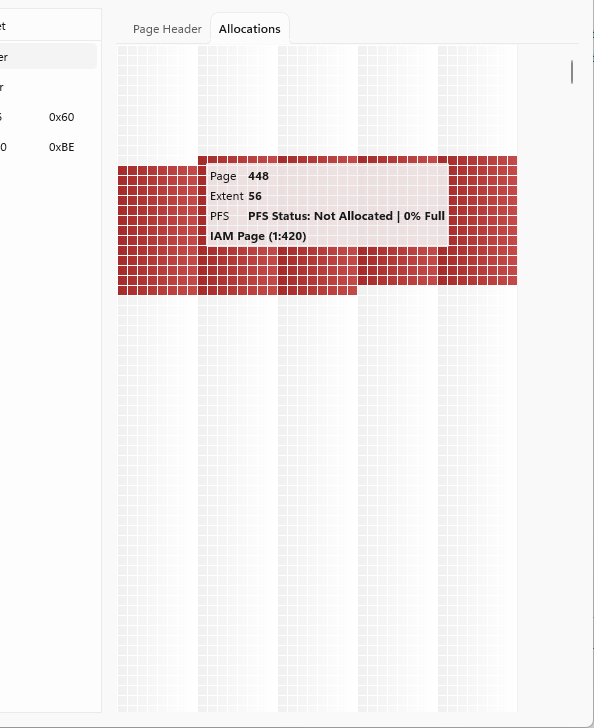
This is a miniature version of the database allocation map, showing just this object's extents. The database allocation map view is built exactly this way - by reading the IAM chain of every object.
The other allocation page types work on the same principle - GAM, SGAM, DCM, and BCM pages are all bitmaps with one bit per extent, and PFS pages use a byte per page. Try opening (1:2) to see the GAM.
Summary
In this part we:
- Opened pages by address and by navigating links
- Decoded the page header and its fields
- Looked at how records are stored in slots and decoded the FixedVar record format
- Made a heap row move by growing it past its page's free space, leaving a forwarding stub behind
- Followed the doubly linked leaf pages of a clustered index
- Looked at the allocation pages that track storage - IAM, GAM, and PFS
Next: Part 3 - Indexes