
Part 3 - Indexes
In this part we'll look at how indexes are structured and how to navigate them:
- Heaps, clustered indexes, and non-clustered indexes
- The Index view
- Index root, leaf, and levels
- Index records and down page pointers
This part uses the dbo.HeapTable and dbo.ClusteredTable tables created in Part 1 and Part 2.
Step 1 - B-Tree indexes
SQL Server indexes are B-Trees (balanced trees). Every index has a single root page at the top and one or more leaf pages at the bottom, with intermediate levels in between if the index is big enough.
- In a clustered index the leaf level is the table data itself, in key order. The table only exists once - the clustered index is the table.
- In a non-clustered index the leaf level contains the index key columns plus a pointer back to the row - the clustering key for a table with a clustered index, or a RID (Row Identifier) for a heap.
- A heap has no index structure at all - just data pages tracked by the IAM chain.
Pages above the leaf level are Index pages. Each record on an index page contains a key value and a down page pointer to the page at the level below where that key range starts. A seek starts at the root and follows down page pointers until it reaches the leaf.
The Index Level field in the page header gives the level - 0 is the leaf, and the highest number is the root.
Step 2 - Opening the Index view
Internals Viewer can visualize an entire index. There are two ways to open the Index view:
- Click the View link in the Index column of the Allocation Info table
- Click the Index button in the Page Viewer toolbar when viewing a page that belongs to an index
Find dbo.ClusteredTable / PK_ClusteredTable in the Allocation Info table and click View.
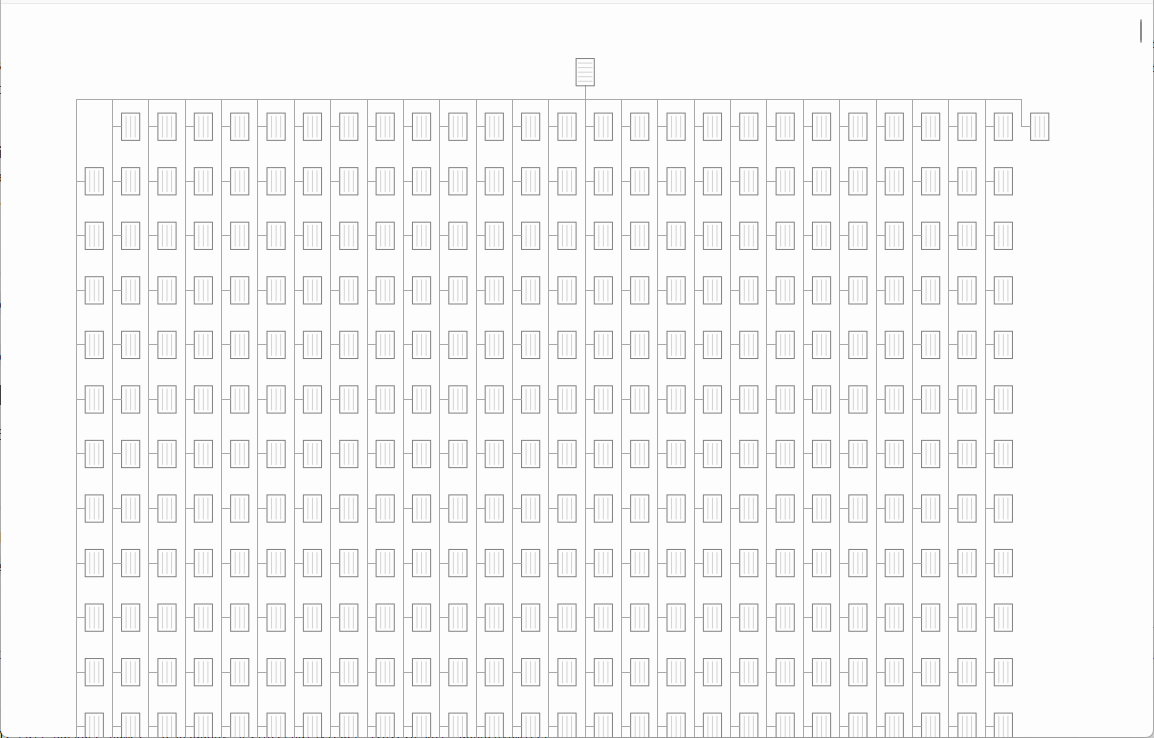
The Index view draws the index as a tree of pages - the root page at the top, connected to the pages below it, down to the leaf level. This is the actual physical structure of the index, built by following the down page pointers from the root.
TIP
An index tree can be far bigger than the screen - zoom in and out with the mouse wheel, and drag to pan.
The header bar shows the index type and name, and the command bar's overflow menu has the Object / Index Ids.
Step 3 - Navigating the index
Click on a page in the tree to see its details:
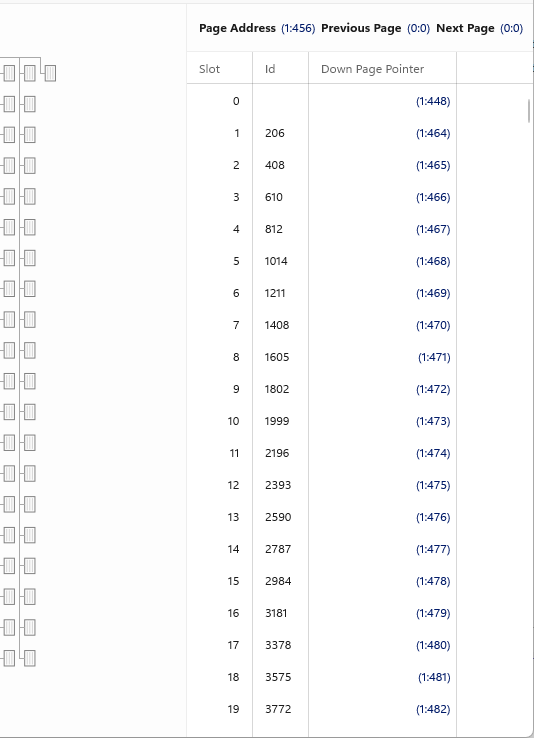
The panel shows:
- Page Address, Previous Page, and Next Page - like the leaf level, the pages within each index level are linked together in a doubly linked list
- The slot table with the decoded index records - the key columns (
Idfor our clustered index) and the Down Page Pointer for each record
Each record on this page marks the start of a key range. In the screenshot slot 1 has Id 206 and slot 2 has Id 408, so every row with Id from 206 to 407 is in the page slot 1 points to - (1:464).
NOTE
The first index record at each level often has an empty key. It marks "everything before the next key" so a seek always has somewhere to go.
Clicking a Down Page Pointer or a page address moves to that page within the Index view. Shift + click a page in the tree, or its page address, to open it in the Page Viewer instead. Try following the tree from the root:
- Click the root page (the single page at the top) and pick a Down Page Pointer
- If the index has an intermediate level, that page is an Index page -
Index Level1, with more down page pointers - Follow again and you reach a Data page at
Index Level0, containing the actual rows
That root-to-leaf walk is exactly what an index seek does - typically 2-4 page reads to find any row among millions.
See the Index Records reference for the index record format.
Step 4 - Non-clustered indexes
Add a non-clustered index to the table:
CREATE INDEX IX_ClusteredTable_TextField ON dbo.ClusteredTable (TextField)
GO
Refresh the database tab. The new index appears in the Allocation Info table with its own colour on the allocation map and its own Root Page, First Page, and First IAM Page entry points - a non-clustered index is a separate B-Tree structure with its own pages.
Click View for IX_ClusteredTable_TextField.
The tree has the same shape - root, levels, leaf - but the leaf level is not the table data. Open a leaf page (Index Level 0) and look at a record:
- The index key -
TextField - The clustering key -
Id
The clustering key is how the non-clustered index points back to the table. A key lookup uses this value to seek into the clustered index to fetch the rest of the row.
Step 5 - Non-clustered indexes on a heap
For a heap there is no clustering key to point to, so non-clustered indexes use a RID instead. Add an index to the heap table from Part 1:
CREATE INDEX IX_HeapTable_NumberField ON dbo.HeapTable (NumberField)
GO
Refresh, open the index view for IX_HeapTable_NumberField, and look at a leaf level record. Along with the NumberField key there is a RID field with a value in (File Id:Page Id:Slot Id) format - a direct physical pointer to the row: the page it's on, and its slot.
The RID is plain text in the Index view. Shift + click the leaf page to open it in the Page Viewer, where the RID is a link - click it and the heap page opens with the record at that slot.
This is the trade-off between the two pointer types:
- RIDs are a direct physical address - a RID lookup is a single page read, but if the row ever moves (e.g. an update that no longer fits in place) the heap leaves a forwarding stub behind
- Clustering keys are logical - rows can move freely within the clustered index without breaking non-clustered indexes, at the cost of a root-to-leaf seek for each lookup
Summary
In this part we:
- Covered the B-Tree structure - root, intermediate levels, and leaf
- Visualized indexes with the Index view
- Walked an index from root to leaf using down page pointers, the same path as an index seek
- Saw how non-clustered index leaf records point back to the table - clustering key for clustered tables, RID for heaps
Next: Part 4 - Query