
Allocations
A database opens to the Allocations view. It has two parts - the Allocation Map showing the physical layout of the database, and the Allocation Info table listing the objects in it, with a splitter between them.
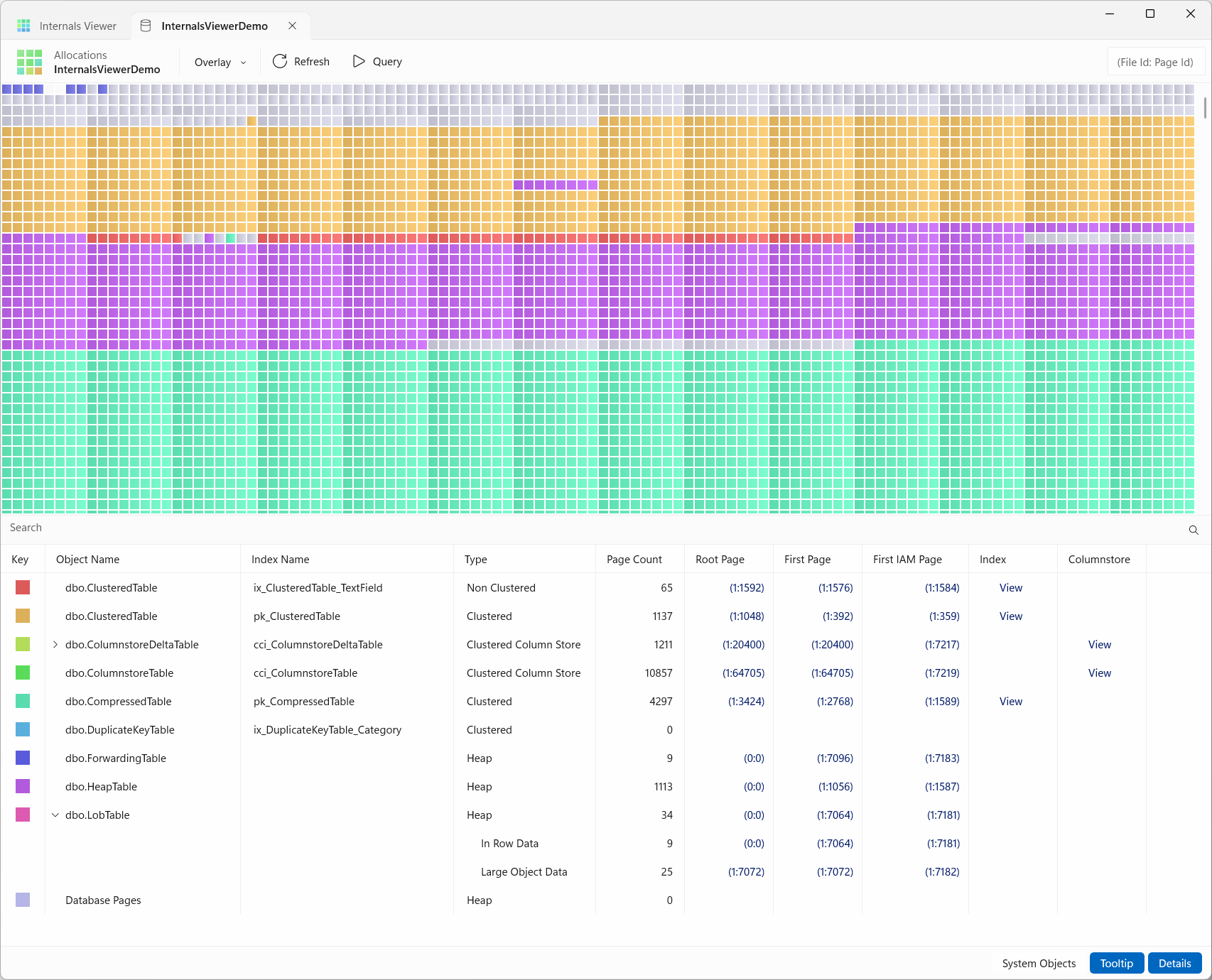
Toolbar
- Overlay - adds a layer of extra information on top of the map, see Overlay
- Refresh - reloads the database's metadata and allocations, to pick up changes made since it opened
- Query - opens a Query tab for the database, for SQL Server connections only
- Page address box - type a page address as
(File Id:Page Id), orFile Id:Page Id, and press Enter to open it in the Page Viewer. Right-click it for Copy DBCC PAGE command to clipboard
The toggles at the bottom right of the view are System Objects, see System objects, and Tooltip, see Tooltip.
Allocation Map
The Allocation Map is a visualization of the physical layout of each database data file.
Each block represents a page, the 8 KB unit the storage engine uses to manage data. Pages are grouped into units of eight called extents, covering 64 KB. Extents are the unit SQL Server allocates space in, and the Allocation Map colour codes each page by the object it is allocated to.
TIP
Clicking on a page opens it in the Page Viewer, in a new tab.
Use the mouse wheel or scrollbar to scroll up and down the database file.
The Allocation Map can be zoomed in and out with Ctrl + mouse wheel.
How this works
The Allocation Map is a render of the IAM (Index Allocation Map) chains for all objects.
Internals Viewer decodes and reads the internal tables and follows the IAM chains for each object, using the First IAM then following via the Next Page address.
Every allocation unit of an index - in-row data, LOB data and row-overflow data - is drawn in the index's colour, so the map shows all of a table's storage. IAM pages, and pages allocated one at a time from mixed extents, are drawn as single pages.
Tooltip
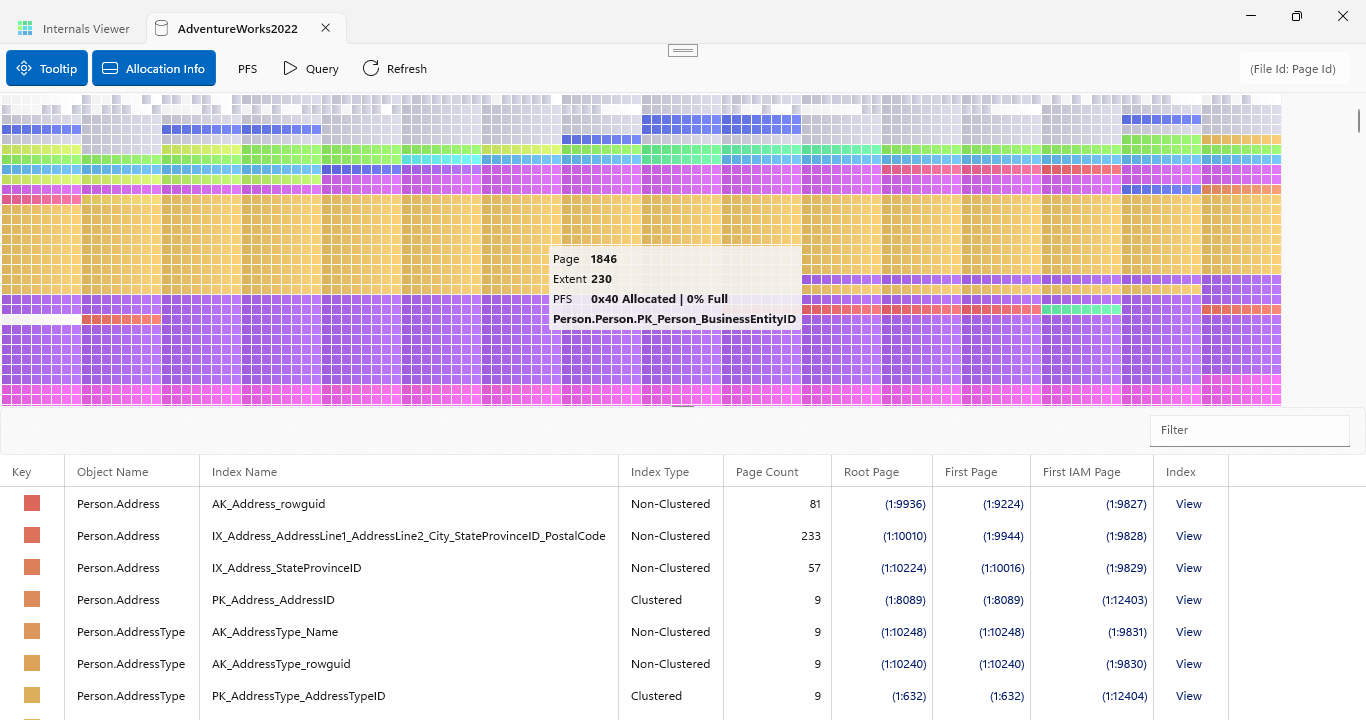
With the Tooltip toggle on, hovering over a page shows its Page Id, its Extent Id, its PFS status (see below), and the object the page is allocated to - or what the page is for, if it is one of the database's own pages, such as File Header, PFS, GAM or Boot Page. The toggle is on by default and remembered.
Multiple files
A database with more than one data file has a map for each, headed with its file id, logical name and physical file name. They are stacked one above the other, and the button on the first file's header switches to a tab per file instead. Only data files are shown - the log is not made of pages.
System objects
SQL Server's own system tables are allocated in the database like any other table. By default they are drawn together in grey as System Objects, which keeps them out of the way of the user tables. With the System Objects toggle on, each system table gets its own colour and its own row in the Allocation Info table.
The Database Pages row in the Allocation Info table is the database's own pages - the file header, the boot page, and the GAM, SGAM, DCM, BCM and PFS pages. Select it to see where they sit in each file.
Overlay
The Overlay menu adds a layer of extra information on top of the Allocation Map:
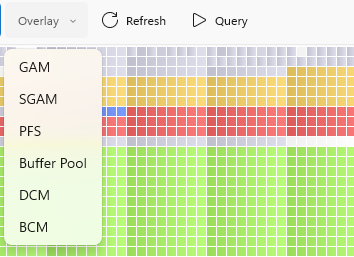
- GAM - Global Allocation Map, tracking which extents are allocated
- SGAM - Shared Global Allocation Map, tracking mixed extents with free pages
- PFS - Page Free Space, see below
- Buffer Pool - see below
- DCM / BCM - the Differential Changed Map, tracking extents changed since the last full backup, and the Bulk Changed Map, tracking extents changed by minimally logged operations since the last log backup
Once selected, the overlay's name replaces Overlay on the toolbar. Click the arrow beside it to switch to another overlay, or the name itself to turn the overlay off. The GAM, SGAM, DCM and BCM overlays are about extents rather than objects, so the objects are hidden while one is shown. The PFS and Buffer Pool overlays describe the objects' pages, so the objects stay, faded.
Buffer Pool
The Buffer Pool is SQL Server's in-memory cache of database pages. The Buffer Pool overlay marks each page that is currently held in it with a small triangle in its top left corner:
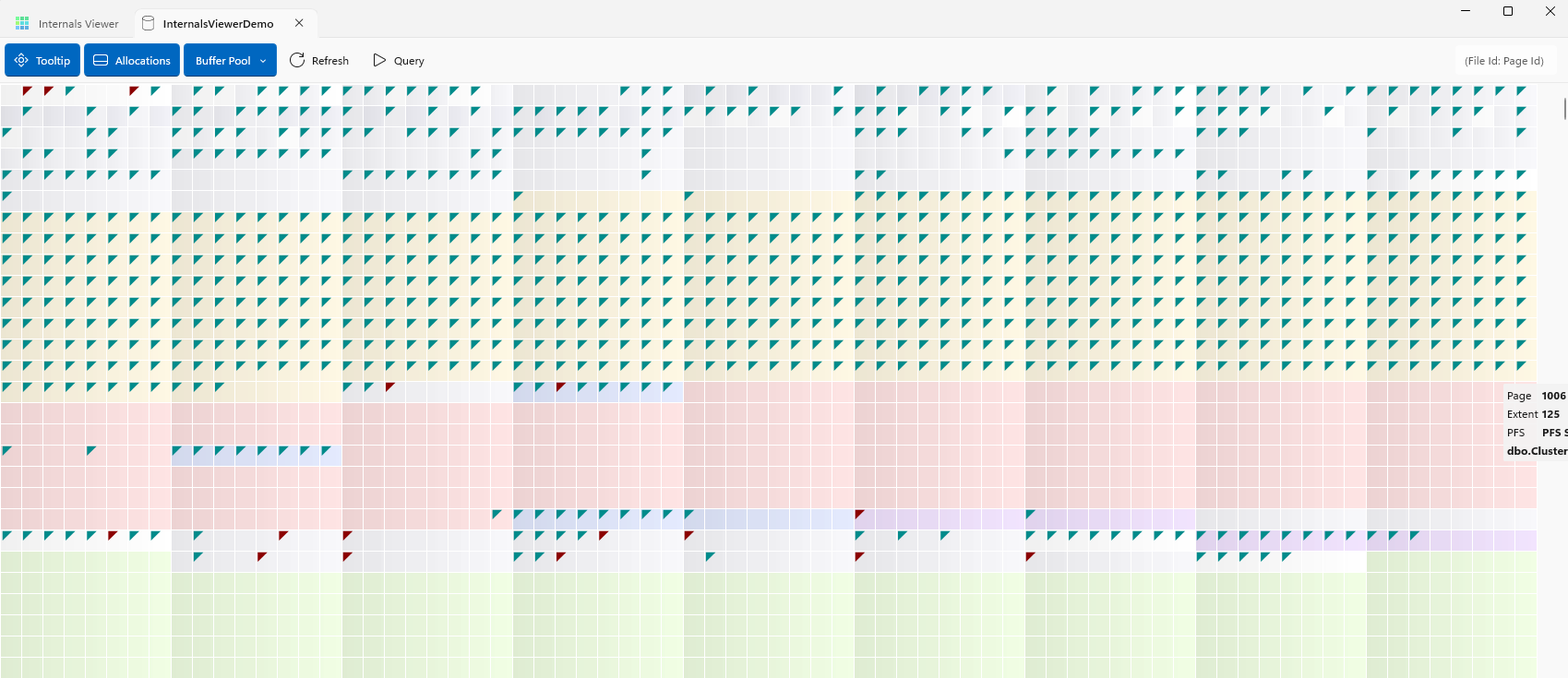
Pages in the Buffer Pool can be clean, meaning they have not been modified, or dirty, meaning they have been modified and changes have not yet been written to disk (but will have been written to the transaction log).
- Cyan - the page is clean
- Red - the page is dirty
The overlay reads the server's buffer pool, so it is only available for SQL Server connections. It is read again each time it is selected and on every Refresh.
TIP
This is a good way to see write behaviour in action - modify some data, and the changed pages show as dirty (red) in the Buffer Pool overlay until SQL Server flushes them back to disk, e.g. by running CHECKPOINT. See Log Records for why modified pages can stay dirty in memory long after the query finishes.
PFS (Page Free Space)
PFS (Page Free Space) pages track the status of every page in the database, one byte per page, including:
- Allocation status
- Space used in the page
- If the page contains ghost records
- If the page is part of a mixed extent
- If the page is an IAM page
The PFS overlay is best viewed zoomed in:
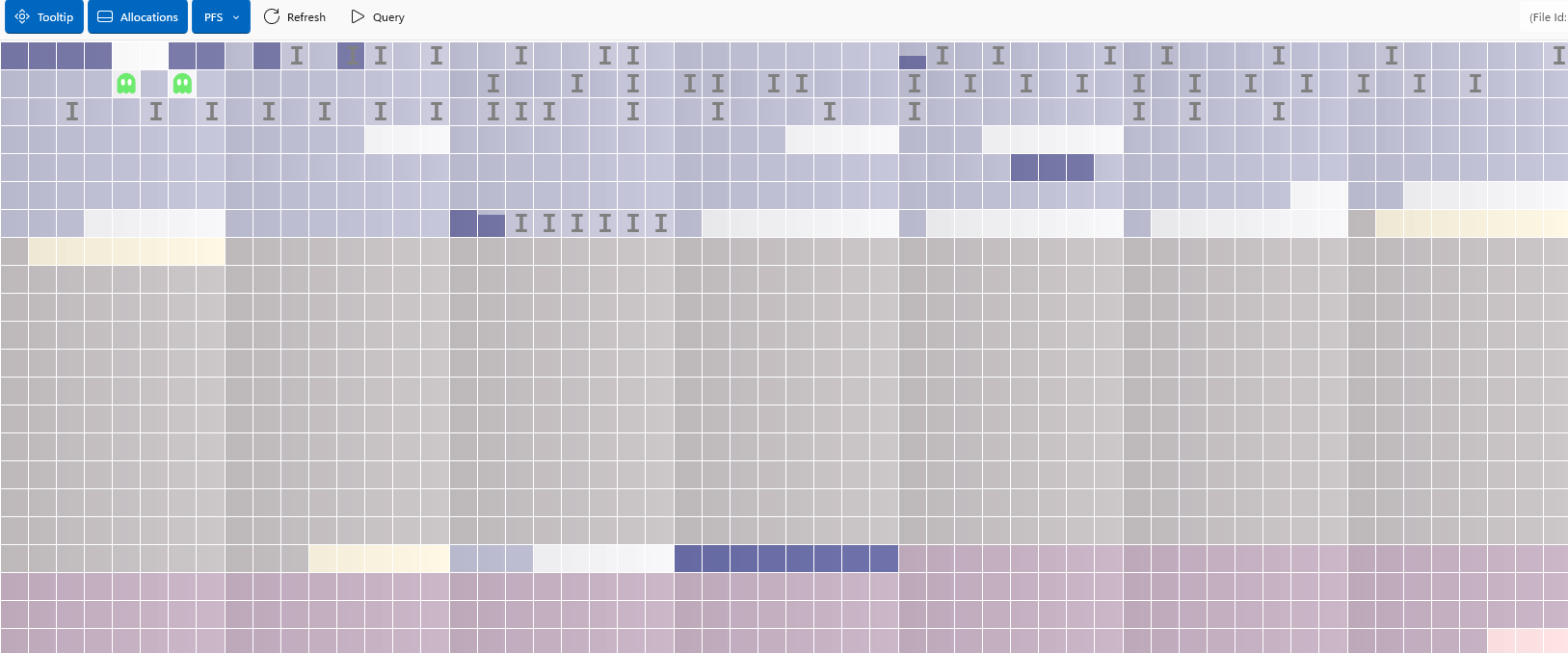
- Space Free - a bar filled to show how full the page is: Empty, 50%, 80%, 95%, or 100%
- Ghost Record - a green ghost icon marks a page containing ghost records (rows deleted but not yet cleaned up)
- IAM Page - marked with an I
- Is Allocated - allocated pages are shaded. Unallocated pages are left blank
The full PFS status for a page is also available on the tooltip.
How this works
PFS pages store the status of every page as a single byte, so one PFS page covers 8088 pages. The first PFS is always at Page 1 in a database file. If a file spans more than 8088 pages the PFS repeats at this interval (page 1, then 8088, 16176 etc.)
Internals Viewer reads the PFS chain using the size of the file and the PFS interval of 8088.
See the source code for more information on how the PFS byte is decoded.
Allocation Info
The Allocation Info is a table of the indexes and tables in the database, shown below the Allocation Map.
It gives a key to the colour codes used on the Allocation Map. Selecting an object highlights its pages on the map by fading everything else. Shift + click selects multiple objects to highlight together, and clicking a selected object again deselects it.
The Search box filters the table by name, matching anywhere in schema.table.index. The Object Name, Index Name, Type and Page Count columns can be sorted by clicking their headers.
The columns are:
- Key - the object's colour on the map
- Object Name and Index Name
- Type - Heap, Clustered, Non Clustered, Clustered Column Store, Non Clustered Column Store, etc.
- Page Count - the pages allocated to it, from its IAM chains
- Root Page, First Page and First IAM Page - its entry points, see below
- Index - View opens a clustered or non-clustered index in the Index View
- Columnstore - View opens a columnstore index in the Columnstore Viewer
An object with more than one partition or allocation unit expands into a row for each. A partitioned table has a row per partition, labelled Partition N, and each row has its own entry points. An allocation unit row gives its type - In Row Data, Large Object Data or Row Overflow Data. A columnstore index's rows are named for what they hold - Segments/Dictionaries, Delete Bitmap and Delta Store - and start collapsed.
Entry Points
The entry points give information on how to find where a table or index is physically stored.
| Index Type | Root Page | First Page | First IAM |
|---|---|---|---|
| Clustered | ✅ | ✅ | ✅ |
| Non-Clustered | ✅ | ✅ | ✅ |
| Heap | ❌ | ✅ | ✅ |
TIP
Clicking on an entry point opens the page in the Page Viewer
For indexes, the View link in the Index column opens the whole index in the Index View
The three entry points for any object are:
Root Page
This is the root page and start point of an index if the object is a clustered or non-clustered index.
An index seek would start from this point and traverse the index to find data.
A heap has no index structure, so its Root Page is (0:0), an empty value.
First Page
This is the first data page of a table with a clustered index, or the first leaf level page of a non-clustered index.
Subsequent pages can be traversed using the Next Page and Previous Page (double linked list) values in the page header.
For a heap, First Page is the first page allocated to it. A heap's pages are not linked to each other, so the rest are found from its IAM chain rather than by following Next Page.
First IAM Page
SQL Server tracks object allocations using IAM (Index Allocation Map) pages. Extents are tracked in a bitmap, one bit per extent. One IAM covers around 64,000 extents. If tracking is needed for more than this amount further IAMs are chained together, linked via the page header.
63,904 bits = 7,988 bytes = 1 page (8,192 bytes) less page header/overhead.
How this works
Entry points are stored in the system base table sys.sysallocunits.
Base tables cannot be queried unless using a DAC (Dedicated Admin Connection). Internals Viewer reads the base table directly.
sys.sysallocunits is the basis of the sys.system_internals_allocation_units view.
The page address values are in binary format. They can be decoded using the undocumented sys.fn_PhysLocFormatter function.
SELECT *
      ,sys.fn_PhysLocFormatter(first_page)     AS decoded_first_page
      ,sys.fn_PhysLocFormatter(root_page)      AS decoded_root_page
      ,sys.fn_PhysLocFormatter(first_iam_page) AS decoded_first_iam_page
FROM   sys.system_internals_allocation_units