
SQL Editor
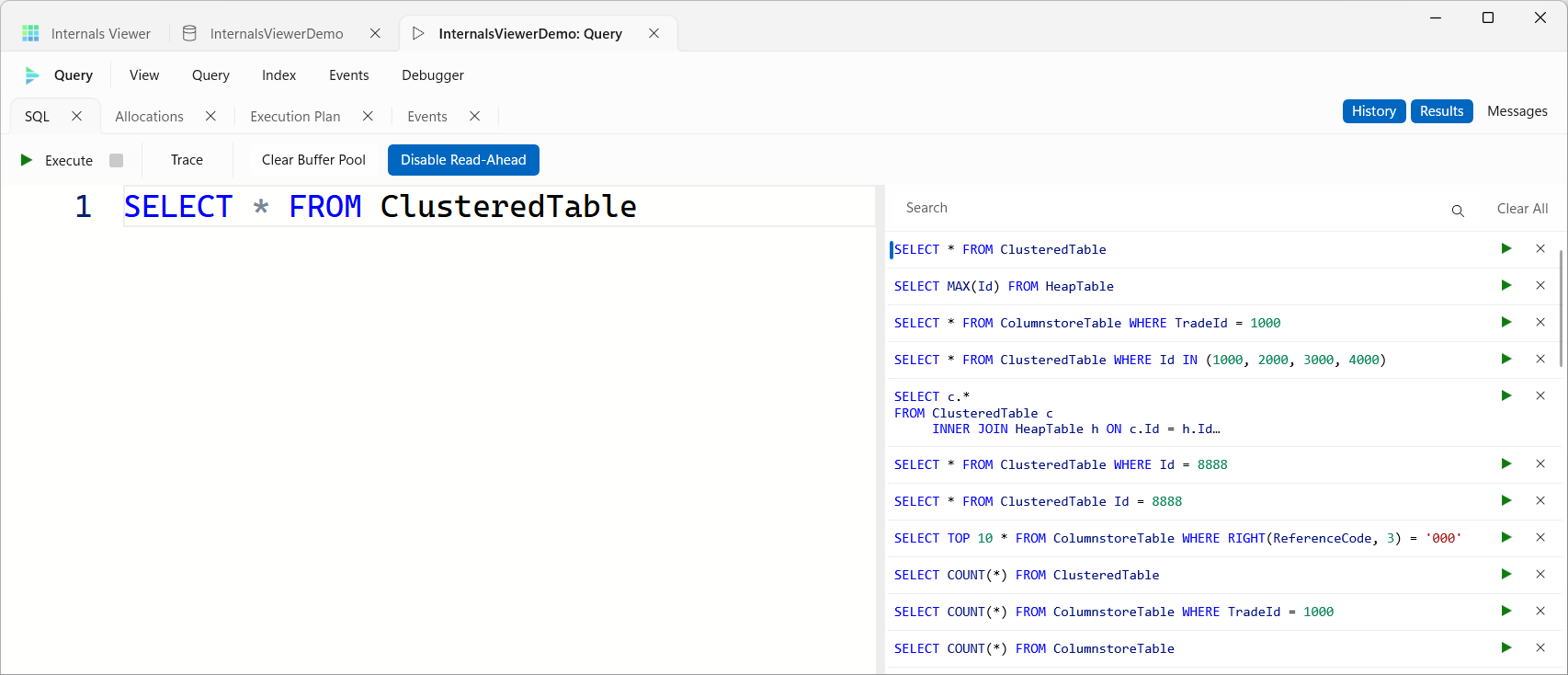
The SQL Editor is where a query is written and run. The editor has SQL syntax highlighting and IntelliSense aware of the connected database's schema.
Its command bar has:

- Execute - runs the query. While it runs it reads Executing and the square Stop button beside it turns red - click Stop to cancel the query
- Simulate - opens the Simulation pane, which steps through the query's plan
- Clear Buffer Pool - empties the buffer pool first (
CHECKPOINT, thenDBCC DROPCLEANBUFFERS) so every page the query touches is physically read. Don't use this on a server anyone else is using - it empties the buffer pool for the whole server - Disable Read-Ahead - on by default. Makes the engine read pages individually instead of pre-fetching large blocks, using trace flag 652 for the query's session, giving a much clearer picture of the access pattern
Clear Buffer Pool and Disable Read-Ahead are remembered, and only apply while Track query is on - see Track query below.
The tab strip has toggles for the panes around the editor:
- History - the query history
- Results - when on, the query returns its result set, shown in the Results tab once there is one. When off, rows are read and counted but not kept - useful for cutting down noise on queries where only the storage engine activity matters. Off by default, and remembered
- Messages - the Messages tab, with the progress of each run, row counts and any errors. It opens by itself when a query runs
TIP
- F5 executes from the keyboard
- If text is selected in the editor, Execute runs just the selection
- Ctrl + H shows and hides the History, and Ctrl + R the Results and Messages
- Ctrl + mouse wheel changes the editor font size, and the size is remembered
Track query
Track query on the Query menu, on by default, is what makes a run a trace. While it is on, Execute runs the query with an Extended Events session, captures the execution plan, runs a data modification inside a transaction that is rolled back, and loads everything into the Timeline and the other panes.
With it off, the query just runs. There is no event session, no plan and no timeline, Clear Buffer Pool and Disable Read-Ahead are not applied, every GO batch in a script runs in turn - and a data modification is not rolled back, so it changes the data.
Track query is not remembered - a new Query tab always starts with it on.
Query history
History opens a panel beside the editor listing the queries run against this database, newest first. Each entry shows the start of the query, with the whole of it in its tooltip.
- Double-click an entry to put it back in the editor
- The run button on an entry puts it in the editor and runs it, and the cross removes it
- Search filters the entries, and Clear All removes them all
Running the same query again moves it back to the top rather than adding it twice. The history is kept for each database, and the oldest queries drop off as it fills.
Multi-statement queries
Only one statement can be traced at a time. Executing a query with multiple statements or GO batches gives the error:
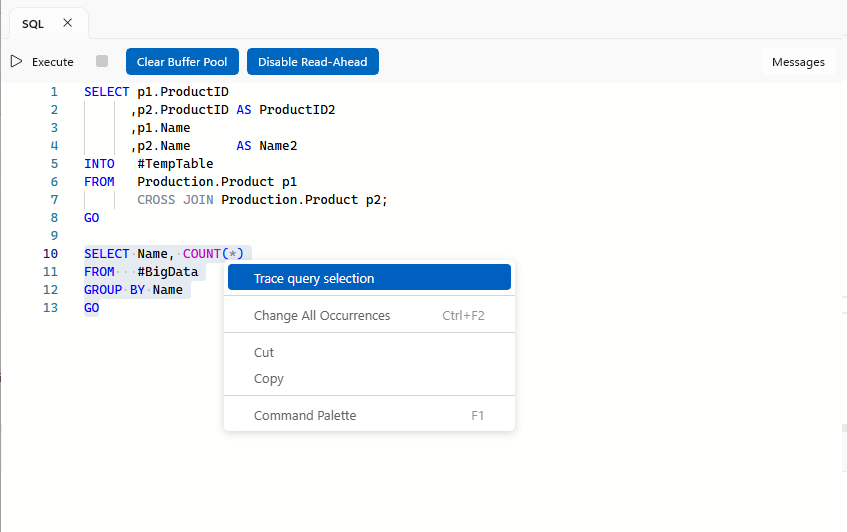
Multi-statement queries cannot be traced. Select a single statement then right click and choose 'Trace query selection'.
For scripts where the statement of interest needs setup or teardown around it - building a temp table first, say - mark just that statement: select it, right-click, and choose Trace query selection.
The marked statement stays highlighted in the editor:
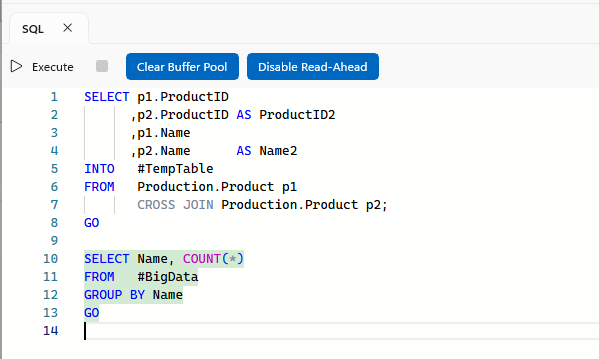
On Execute, everything before the marked statement runs first as untraced setup, the marked statement runs with the trace, and everything after it runs as untraced teardown - so the timeline shows only the statement of interest.
To remove the marker, right-click and choose Clear query selection.