
Columnstore Viewer
A columnstore index does not store rows in pages. Each column of each row group is compressed into a segment of its own, often with a dictionary beside it, and the segments are stored as LOB data. The Columnstore Viewer opens one index and shows it the way it is stored - its row groups, segments and dictionaries laid out as a structure - and decodes any segment or dictionary down to its bytes, with the working shown for every value.
Opening it
- From the allocations - the Allocation Info table on the database tab has a Columnstore column. Click View on a columnstore index's row to open the index in a tab of its own. The viewer shows one partition at a time, so for a partitioned index the link is on each partition's row. The rows beneath the index are its allocation units - Segments/Dictionaries, Delete Bitmap and Delta Store (Row Group N Delta Store where there is more than one).
- From a query - right-click a Columnstore Index Scan in the Execution Plan or on the Timeline and choose Open Index: with the index's name. The viewer opens as a Columnstore: pane in the Query view, so it can sit beside the plan. Open all indexes on the Index menu only opens rowstore indexes.
The bar across the top names the index, says whether it is Clustered or Non-Clustered, and has a Refresh button. The viewer's panes dock like the Query view's. Structure and Metadata are always open, and each segment, dictionary, delete bitmap or delta store opened from them adds a tab beside them - opening one that is already open selects it.
Structure
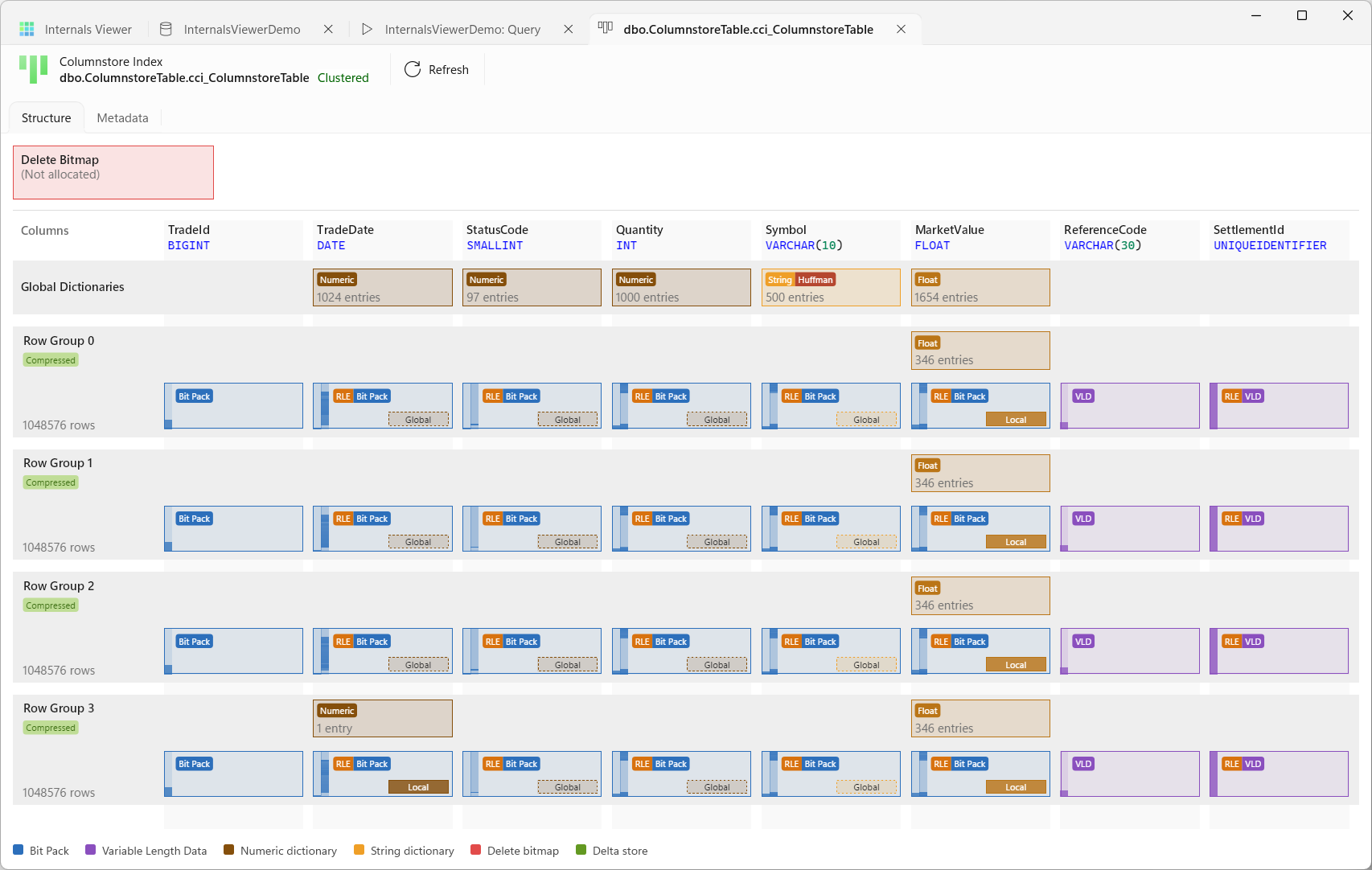
The Structure tab draws the whole index on one grid - a column per column of the index, a row per row group.
- Columns - the header strip names each column with its type. An ordered columnstore marks its sort columns with ↑ and their position. A nonclustered columnstore carries extra locator columns that point back to the table, shown as RID over a heap or Clustered Key over a clustered index.
- Global Dictionaries - a box for each column with a global dictionary, shared by every row group.
- Row groups - each row is labelled with its number, its state - Open, Closed, Compressed, Tombstone or Invisible - and its row count. Above its segments, a row group with local dictionaries has a strip of them.
- Delete Bitmap - a box at the top when the index has a delete bitmap, giving its first page or (Not allocated).
- Delta stores - an open or closed row group has no segments yet. Its rows are still in a delta store, an ordinary B-tree, drawn as a Delta Store box in place of the segments.
Each segment is a block coloured by how its values are stored - Bit Pack or Variable Length Data - with badges for RLE, Bit Pack and VLD, and a small Global or Local marker when it uses a dictionary. The bar down its left side is its size against the largest segment in the index, so the heavy columns stand out, and a second bar, once the segment has been read, shades its RLE runs from top to bottom. Dictionary boxes show whether they are Numeric, String or Float, Huffman when their strings are Huffman coded, and their entry count. The legend at the bottom is the key.
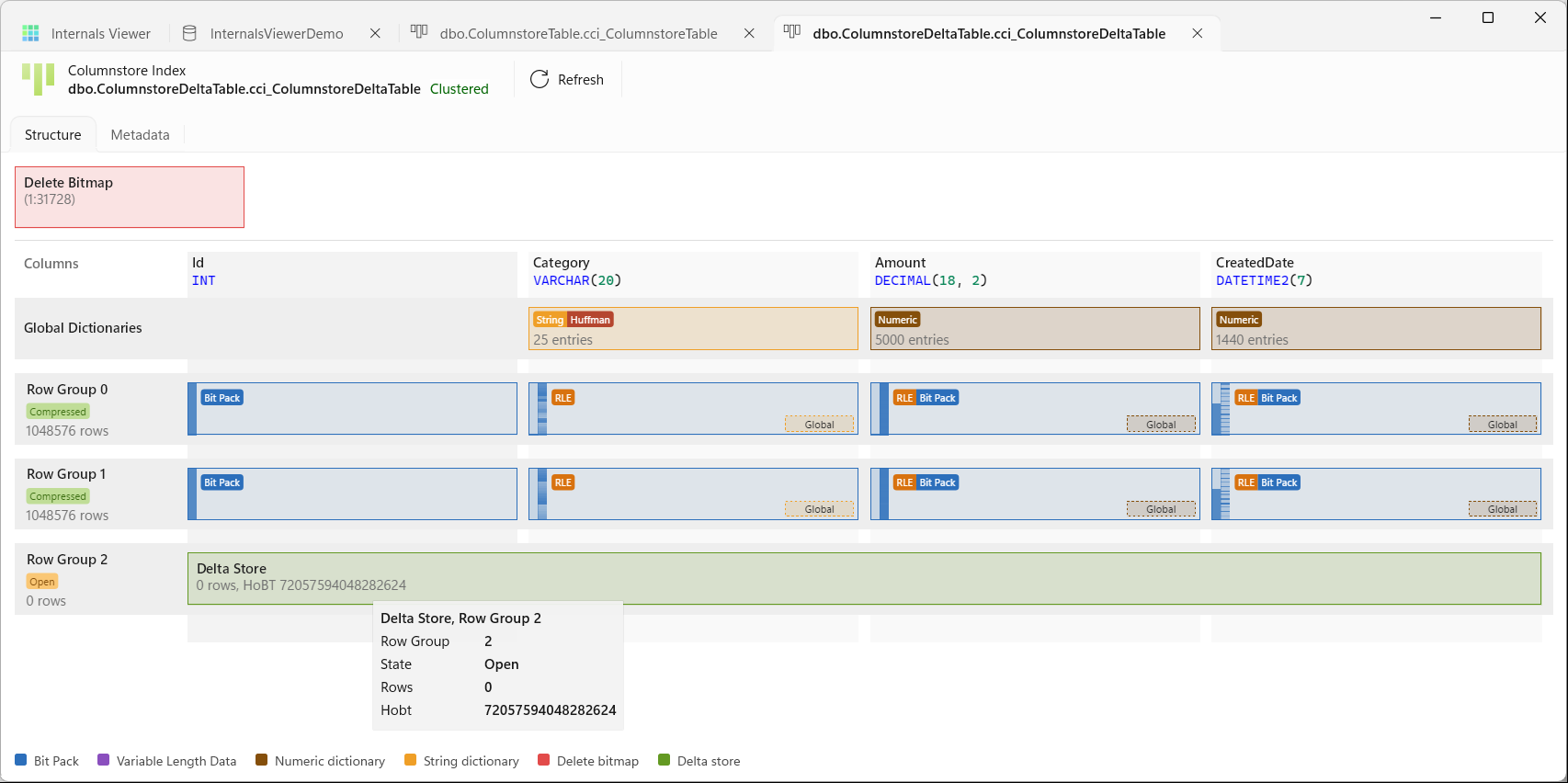
- Hover over anything for its details - a segment's encoding, storage, row count, data pointer and how its values are derived, a row group's state, size and segment count, a dictionary's scope, type, entries and size. The column under the pointer lights up from top to bottom.
- Click a segment, dictionary, delete bitmap or delta store to open it in its own tab.
- Drag to pan, the mouse wheel to scroll, and Ctrl + mouse wheel to zoom at the pointer.
- Right-click a segment or dictionary for Copy DBCC CSINDEX command to clipboard, with Option 0 - Parsed structure and Option 3 - Raw memory dump. The command copied is ready to run on the server, with
DBCC TRACEON (3604)in front so its output comes back to the client - a way to check the viewer's decoding against SQL Server's own.
Metadata
The Metadata tab lists the index's metadata in two grids.
- Row Groups/Segments - a row per segment, by Row Group and Column, with its Encoding, Structure, entry counts, Rows, Size, Bytes Per Row, Nulls, and the data id and value ranges SQL Server keeps for it. View opens the segment, Local or Global opens its dictionary, and the Data Pointer opens the page that holds it in the Page Viewer.
- Dictionaries - a row per dictionary, with its Scope, Type and Sub Type (Hash Table or String Store), Entry Count, Size and Page Count, a View link and its Data Pointer.
Some columns come from reading the segments and dictionaries themselves, so they fill in a moment after the rest.
Segments
A segment tab decodes one segment. The bar across the top gives its column, type, Row Group and Column, how it is stored - RLE, Bit Pack, RLE + Bit Pack or Variable Length Data - and its encoding. Dictionary opens its dictionary, where it has one.
The hex view down the left shows the whole segment blob, with each region marked and named in the gutter - Header, Bookmarks, RLE Array, then Bit Pack or VLD. A segment compressed with COLUMNSTORE_ARCHIVE is shown expanded. The tabs on the right take each region in turn, and choosing one moves the hex view to it:
- Header - every field of the blob's headers, as a tree of markers.
- Bookmarks - the bookmark array, the shortcuts into the RLE array, with the working from each bookmark to the RLE entry it points at.
- RLE Array - every run with its value, what the value is - a value, a bit pack entry or a page and slot - its count and whether it repeats or reads. A value that points somewhere is a link to it. The RLE Runs map below draws the runs down the segment. Hover for a run's rows and value, use the wheel to zoom, and click a run to go to its entry.
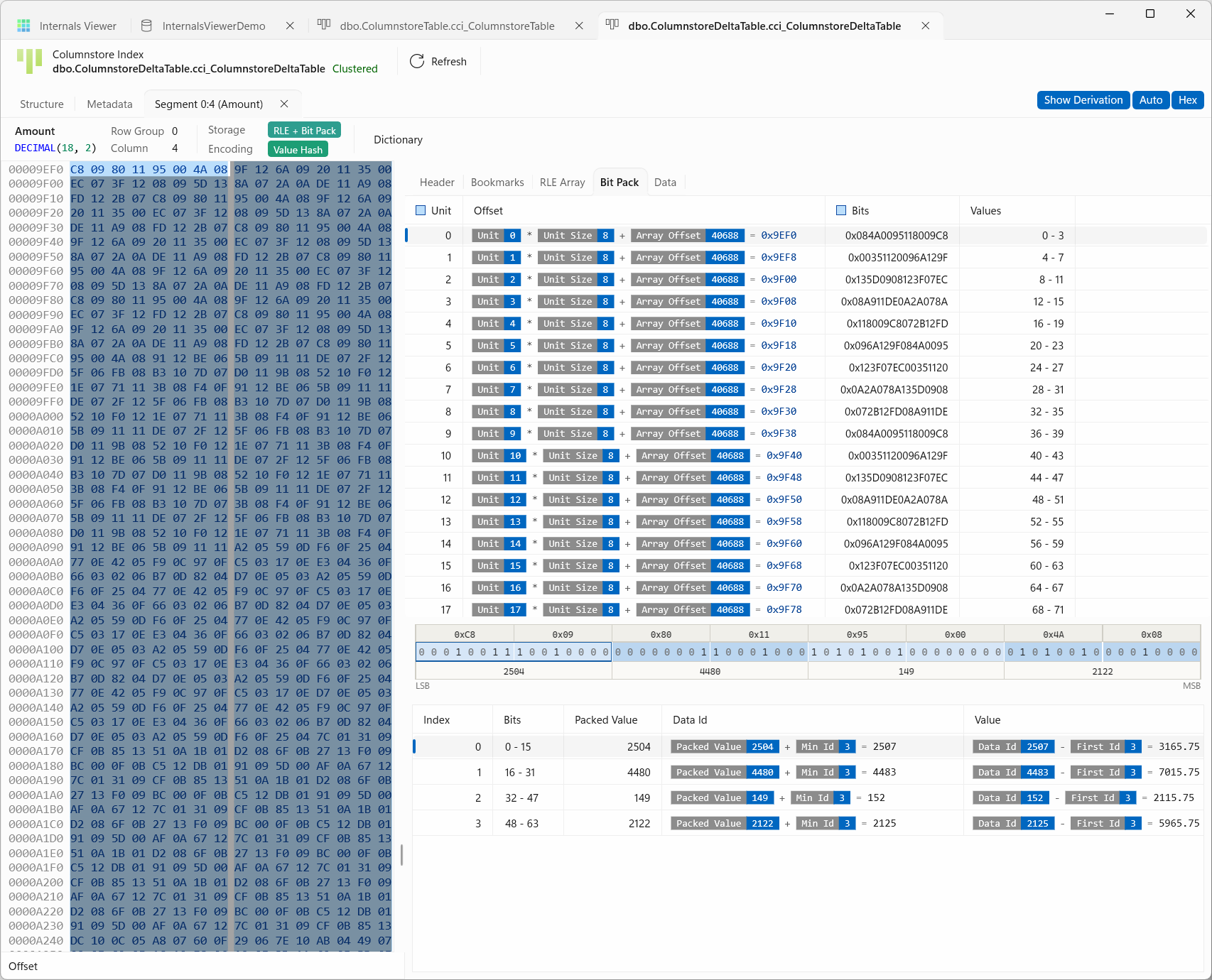
- Bit Pack - the bit pack units. Selecting one shows its bits on a ruler from LSB to MSB, and every value packed into it, with the packed value, the data id and the value it decodes to. Click a band on the ruler to pick out its value.
- Variable Length Data - the pages of a segment whose values are too wide or too varied to bit pack, with each page's header and a Decode tab that expands its payload and lists the values stored in it.
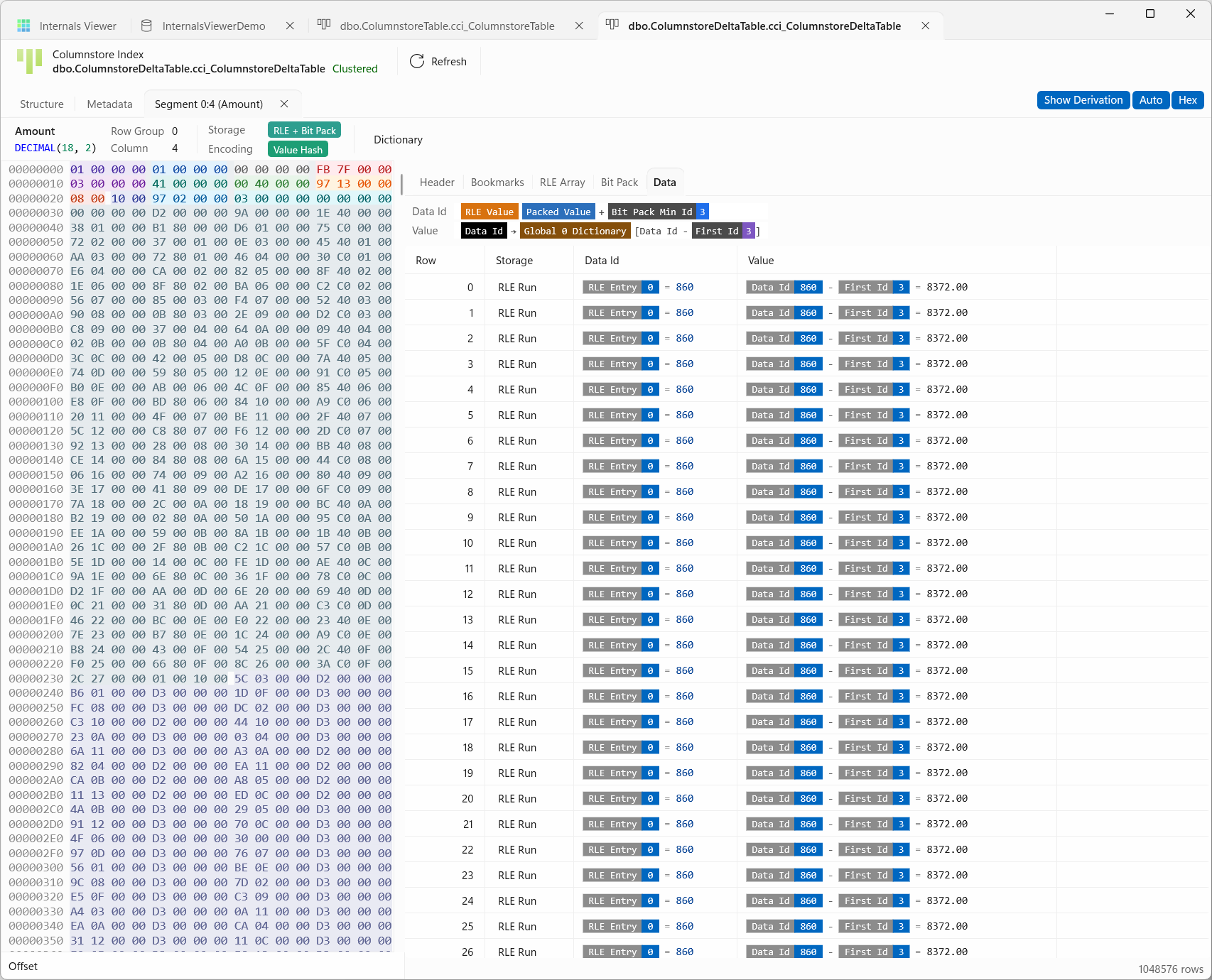
- Data - every row of the segment, decoded. Each row shows where its value came from - a bit pack entry, an RLE run or variable length data - its data id, and its value.
The tabs only appear for the regions a segment has.
Three toggles on the tab strip change how it reads:
- Show Derivation - shows the working behind each value rather than the value alone. The Data tab's chains at the top spell out how a data id and a value are calculated for this segment, as chips. A blue chip is a constant read from the blob, a purple one from the metadata, and hovering over a chip says exactly where it came from. Click a working to go to its source.
- Auto - moves to the tab for the region scrolled into in the hex view.
- Hex - shows or hides the hex view.
Selecting a row in any of the grids marks its bytes in the hex view. The Column Segments reference explains what each region holds - the segment header, the bookmark array, the RLE array and what a run points at, the bit pack array and variable length data.
Segment variations
Two things decide what a segment looks like - its encoding, how the column's values are turned into data ids, and its storage, how those data ids are laid out in the blob. SQL Server picks both per segment, to suit the values in that row group, so two segments of the same column can differ. Both are on the bar across the top of the segment tab and in the Metadata grid.
The encoding is SQL Server's own, from sys.column_store_segments.encoding_type:
| Encoding | Used for | How a data id becomes a value |
|---|---|---|
| Value | Numbers with no dictionary | (Data Id + Base Id) × Magnitude. The column is rebased so its data ids start near zero, and scaled down where every value shares trailing zeros, so the ids need fewer bits |
| Value Hash | Numbers with a dictionary | The dictionary's entry at Data Id - First Id |
| String Hash | Strings and binary values with a dictionary | The dictionary's entry at Data Id - First Id |
| Store By Value | Numbers kept as they are | The data id is the value - a float or real as its raw bits, or an integer kept without a base |
| String Store By Value | Values with no dictionary that are too wide or varied for a data id | Read from the segment's own variable length data - strings without a dictionary, binary and uniqueidentifier values, and some decimals |
A column with nulls sets one data id aside to mean null - the segment's null value - and rows with that id decode as null.
The storage is read from the blob itself:
- Bit Pack - each row's data id, less the segment's lowest, packed into as few bits as the segment's range needs, as many to each 64-bit unit as fit. A single run in the RLE array covers every row. It suits values that change from row to row, like a key, and shows as a Bit Pack tab.
- RLE - runs of one repeated data id, each held once with its count, and no bit pack array at all. It suits a column with few distinct values sorted into long runs, where a million rows can come down to a handful of entries. The RLE Array tab and its RLE Runs map show the runs.
- RLE + Bit Pack - both at once. Where a value repeats the RLE array holds a repeat run, and where the values vary it holds a read run pointing into the bit pack array. The RLE Runs map shows which stretches are which, a repeat run in one track and a read run in the other.
- Variable Length Data - the layout String Store By Value segments use. The values are stored as they are, on pages of their own after the RLE array, and the RLE array's runs address a page and slot rather than holding data ids. A page is compressed or not on its own, and the Variable Length Data tab's Decode expands it.
Bit pack and RLE segments also carry Bookmarks - shortcuts into the RLE array every so many rows, so a reader can start partway down it rather than walk it from the top.
Dictionaries
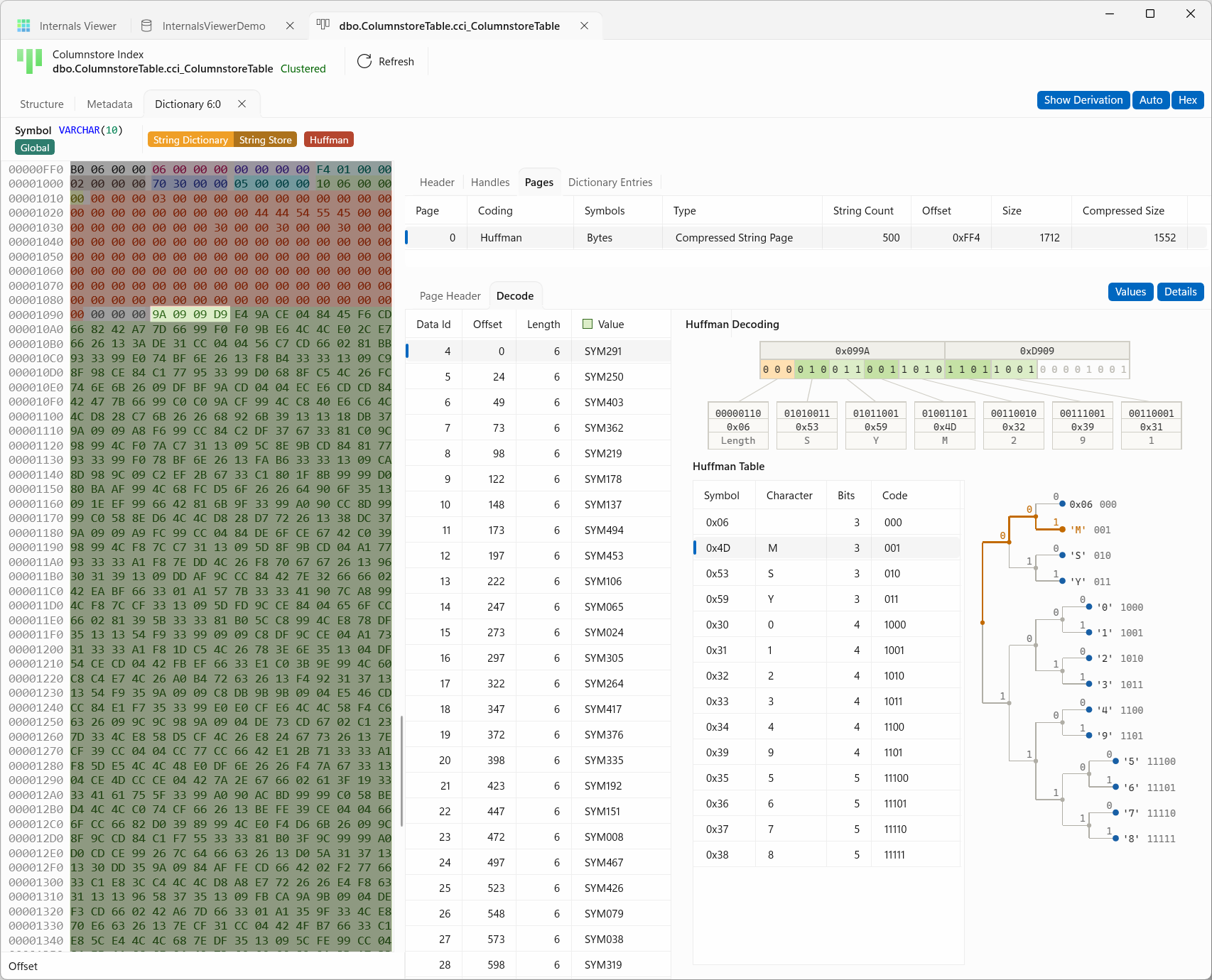
A dictionary tab decodes one dictionary. The bar gives its column and type, its scope - Global, or Local and its id - its kind, such as String Dictionary with String Store or Numeric Dictionary with Hash Table, and for a string dictionary whether it is Uncompressed or Huffman coded. It has the same Show Derivation, Auto and Hex toggles as a segment.
- Header - the dictionary's header fields.
- Handles - for a string dictionary, the handle for each entry - its data id, the page it is on, and its offset and length on that page, counted in bits on a Huffman page and in bytes otherwise. An entry stored off the page shows its LOB pointer in Notes. Page opens that page's decoding at the entry.
- Pages - for a string dictionary, its pages, with how each is coded and how many strings it holds. Decode shows a page's values beside how they were decoded - for a Huffman page the walk through the bits code by code, the Huffman Table of symbols and codes, and the Huffman tree. Selecting a value, a code or a leaf selects it everywhere. Values and Details on the tab strip show or hide the two halves.
- Dictionary Entries - every entry with its data id, its index in the dictionary, and its value.
Dictionary variations
- Scope - a Global dictionary, id 0, belongs to the column and is shared by every row group. A Local dictionary belongs to one row group, for the values the global one does not hold. A segment can use both - data ids up to the global dictionary's last id come from it, and ids beyond that from its row group's local dictionary. The Structure tab draws the global dictionaries in their own strip at the top and the local ones above their row group's segments.
- Numeric - for numbers, dates and times, and decimals. Every entry is the same width, the width of the column's type, so the values sit in a plain array that a data id indexes directly, behind a Hash Table store. Dictionary Entries lists them.
- Float - for
floatandreal, laid out the same way as a numeric dictionary. - String - for character and binary columns. The entries vary in length, so a String Store keeps a handle for each entry - the page it is on, where on the page it starts and how long it is - and the strings themselves on pages. The Handles and Pages tabs show both halves.
- Huffman coding - each page of a string dictionary is Uncompressed or Huffman coded. A Huffman page carries a table of code lengths and packs each string as variable-length codes, with the commonest symbols given the shortest codes. Every string can still be decoded on its own from where it starts, which is why a handle's offset on a Huffman page counts bits rather than bytes. The symbols are Bytes, or Characters for a Unicode column whose characters all fit in a byte, which halves the symbols there are to code. The bar shows Huffman when every page is coded, Huffman and a count such as 3/5 when only some are, and Uncompressed when none are.
- Long values - a string too long to keep on a dictionary page is stored as LOB data instead, and its handle's Notes gives the LOB page, slot and length.
Delete Bitmap and Delta Store
- Delete Bitmap - deleting a row from a compressed row group does not change the segment. The row is marked in the delete bitmap instead, a B-tree with a row for each deleted row. The tab lists them by Row Group and Row Id, with the bitmap's entry points as links to the Page Viewer.
- Delta Store - the pages of an open or closed row group's delta store, with each page's Type, Slots and Free Bytes. Page opens it in the Page Viewer, where its rows decode like any other table's.
How this works
The index's metadata comes from the system base tables sys.syscsrowgroups, sys.syscscolsegments and sys.syscsdictionaries, read with the same record decoder as every other base table, and filtered to the partition. The segments and dictionaries themselves are LOB data, read from the pages their data pointers give and decoded by Internals Viewer rather than by SQL Server - which is why Copy DBCC CSINDEX command to clipboard is there to compare against.
See Column Segments for the segment format.